|
10.23 Sales Activity - Phase 2
KB 3272, Release Note, Sales Activity, 10/3/2025
Get ready to experience the reimagined Sales Activity in 10.23!
This release represents a major leap forward in how Sales Activities are tracked, managed, and reviewed - delivering a more streamlined and flexible workflow to every User. Built to improve usability, reduce setup time, and enhance visibility across your sales process, this update introduces smarter defaults, customizable codes, enhanced Dashboards, and Mobile cross-compatibility. Every enhancement is designed to help you work more efficiently and stay focused on what matters most - your customers.
Whether you're working in the desktop application or on the go with the Sales App, these updates make it easier to log activity, track performance, and maintain consistency. You'll also gain deeper insight into your sales pipeline and customer interactions, keeping your team aligned and informed at every stage.
Schedule your update to 10.23 to take full advantage of the enhanced Sales Activity features!
User Permissions
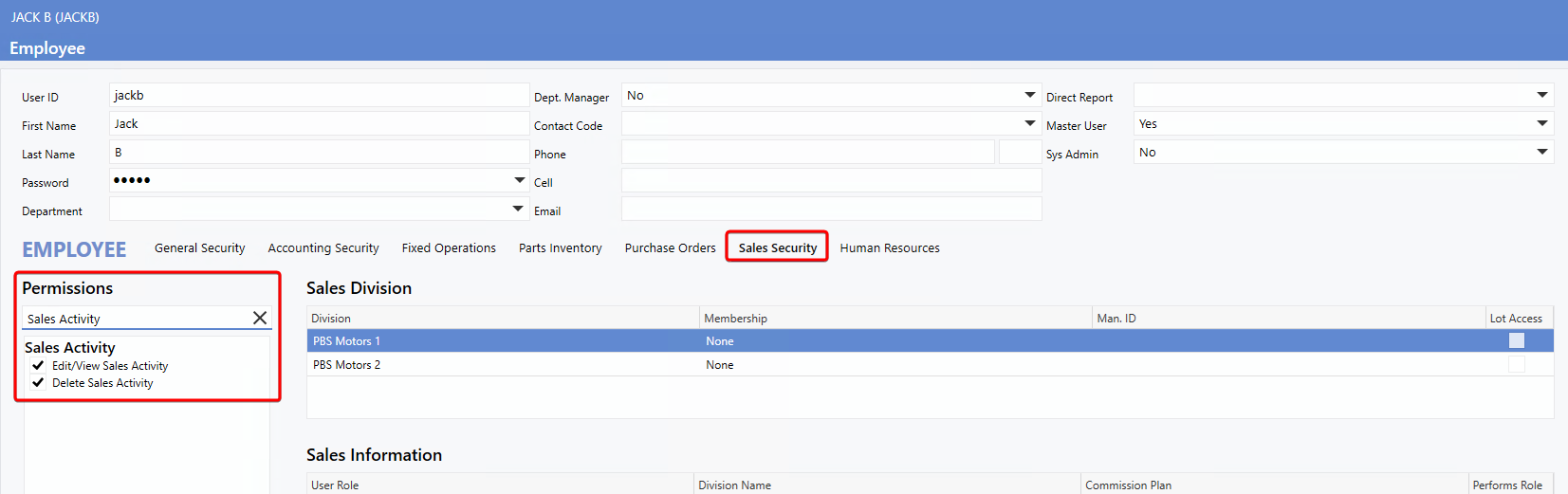
A new
Sales Activity
section has been added to the
Sales Security
tab within the
User Record.
At the bottom of the permission list, you'll now find two new Permissions:
-
Edit/View Sales Activity
-
Grants access to the Sales Activity window
-
Allows Users to create new Activities
-
Allows editing of existing Activities
-
Delete Sales Activity
Maintenance Settings
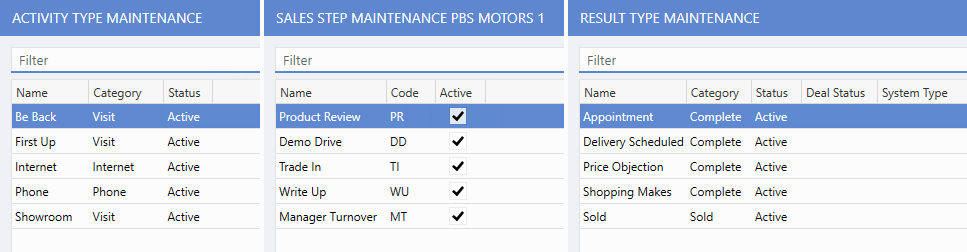
To simplify initial setup, default entries for
Activity Type Maintenance,
Sales Step Maintenance,
and
Result Type Maintenance
are now automatically preloaded if no custom entries exist. This allows Users to begin using the Sales Activity feature immediately without creating new activity types, saving time and reducing setup effort.
To access
all
Sales Activity maintenance windows, follow the path:
Deal > Maintenance > Sales Activity > Activity Type / Result Type / Sales Step
Preloaded Sales Activities Example:
Copying Configurations Across Divisions
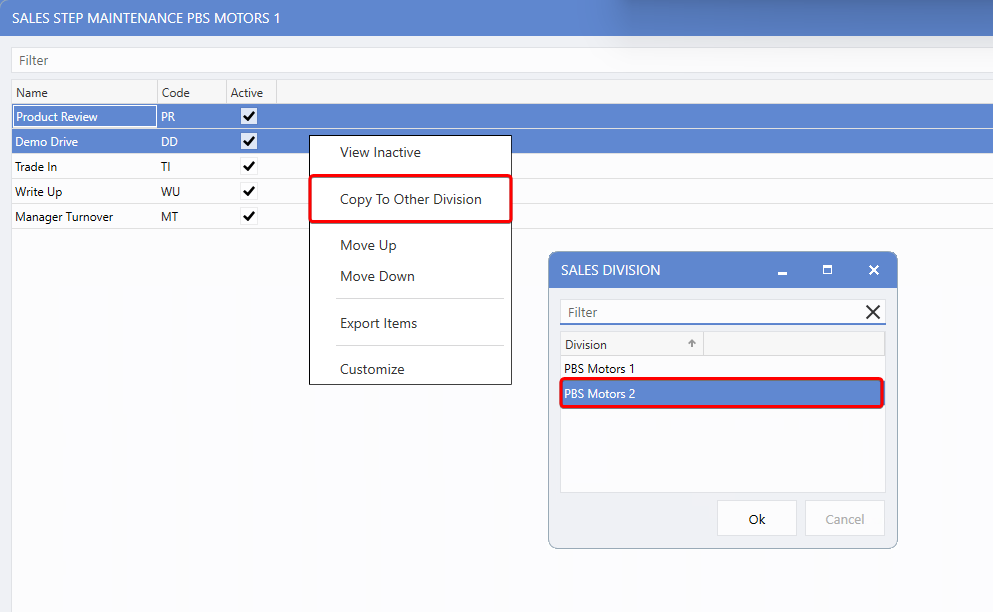
Settings from all three maintenance areas can now be copied to other divisions via right-click >
Copy to Other Division
. This ensures standardized Sales Activities across multiple locations and improves consistency in your sales process.
Custom Codes in Sales Step Maintenance
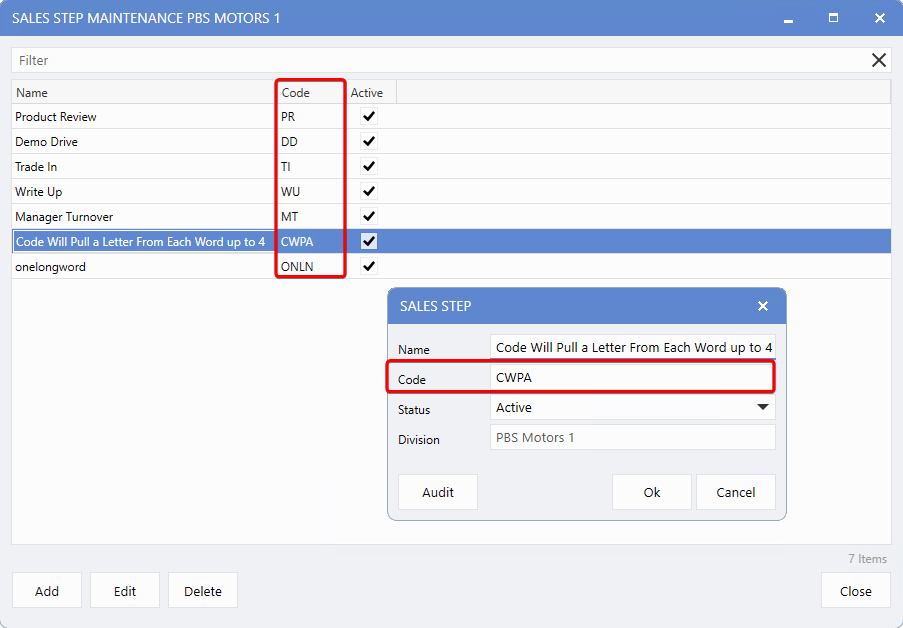
A new field
Sales Step Maintenance
allows Users to create custom codes - up to 4 characters - for each Sales Step. These codes appear in the dashboard summary view and help with easier identification and improved usability:
-
Codes are automatically generated for the default Sales Steps.
-
Users can customize codes if needed.
-
Codes are generated as follows:
-
First letter of up to 4 words.
-
For a word longer than 4 letters, the code will consist of the first 4 consonants.
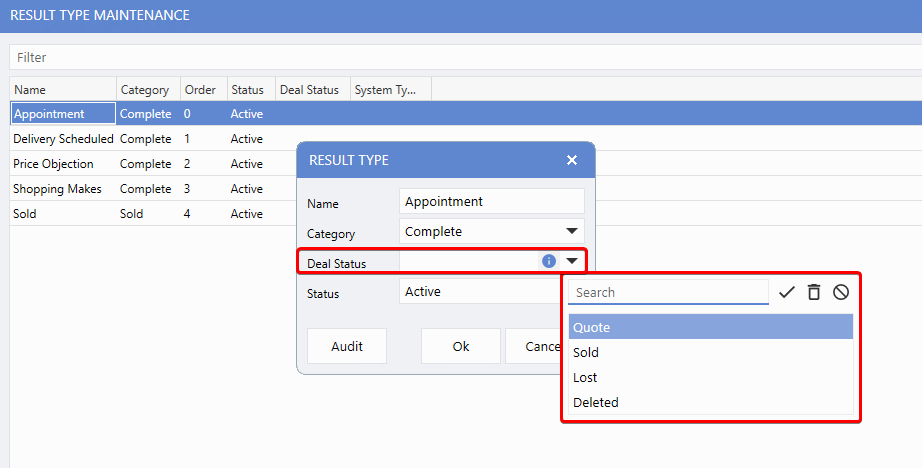
Deal Status in Result Type Maintenance
The
Result Type Maintenance
window now includes a
Deal Status
field. When a result type is applied, the corresponding deal status is automatically set. If the Category is marked
Sold
and no specific status is selected, the system will default to
Sold
- ensuring consistent tracking of finalized deals.
For batch updates, multiple
Deal Statuses
can be quickly copied to another
Result Type
via right click >
Change Deal Status
, streamlining status management and reducing manual work.
Sales Activity Window - Deal
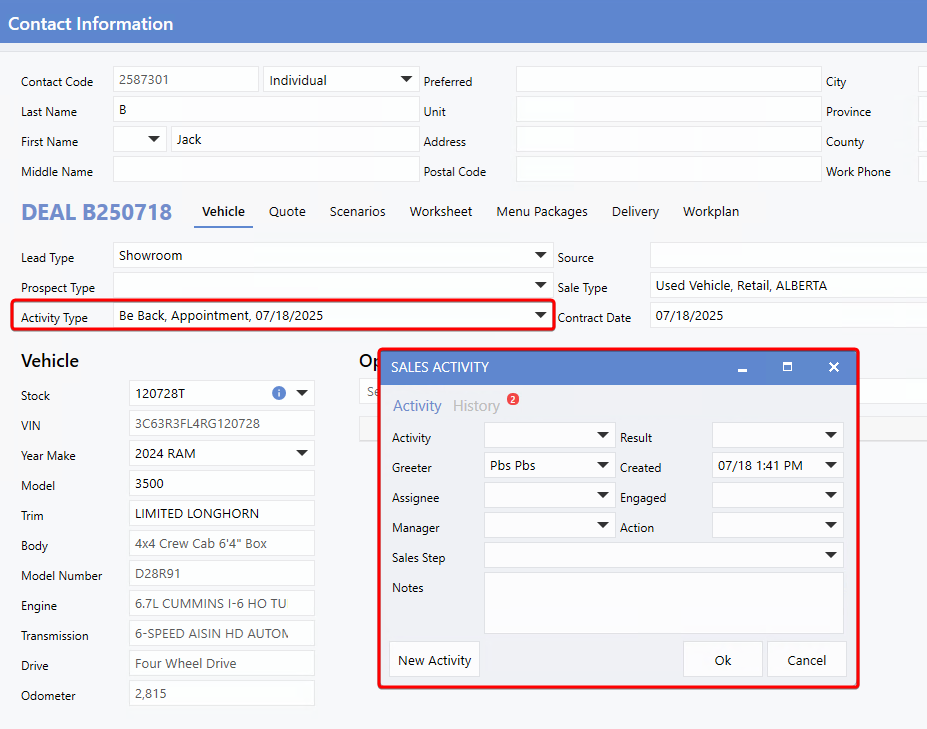
The
Sales Activity
section within a
Deal
has been upgraded from a simple dropdown to a full dedicated window, improving usability and aligning the design with the v10 interface.
To open the window, click the dropdown arrow next to
Activity Type
while in a deal, or access it through the right-hand menu.
The redesigned window features
Activity
and
History
tabs, allowing Users to easily create new Sales Activities and review past ones. This streamlined layout makes it faster and more intuitive to log actions and track customer interactions.
All changes made to Sales Activities are now recorded in the
Deal Audit Log.
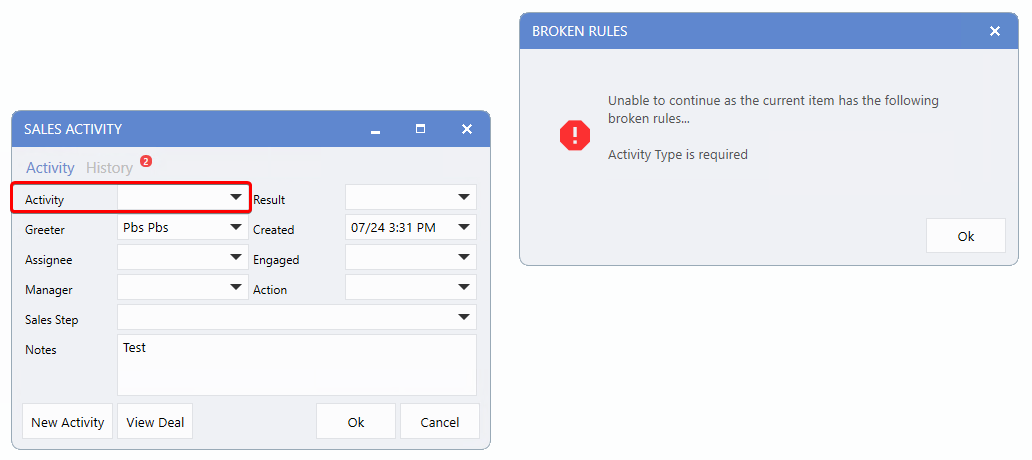
Additionally, selecting an
Activity Type
is required when creating a Sales Activity - attempting to save without one will trigger a broken rule and prevent the entry from being saved.
Sales Activity Dashboard
Summary View
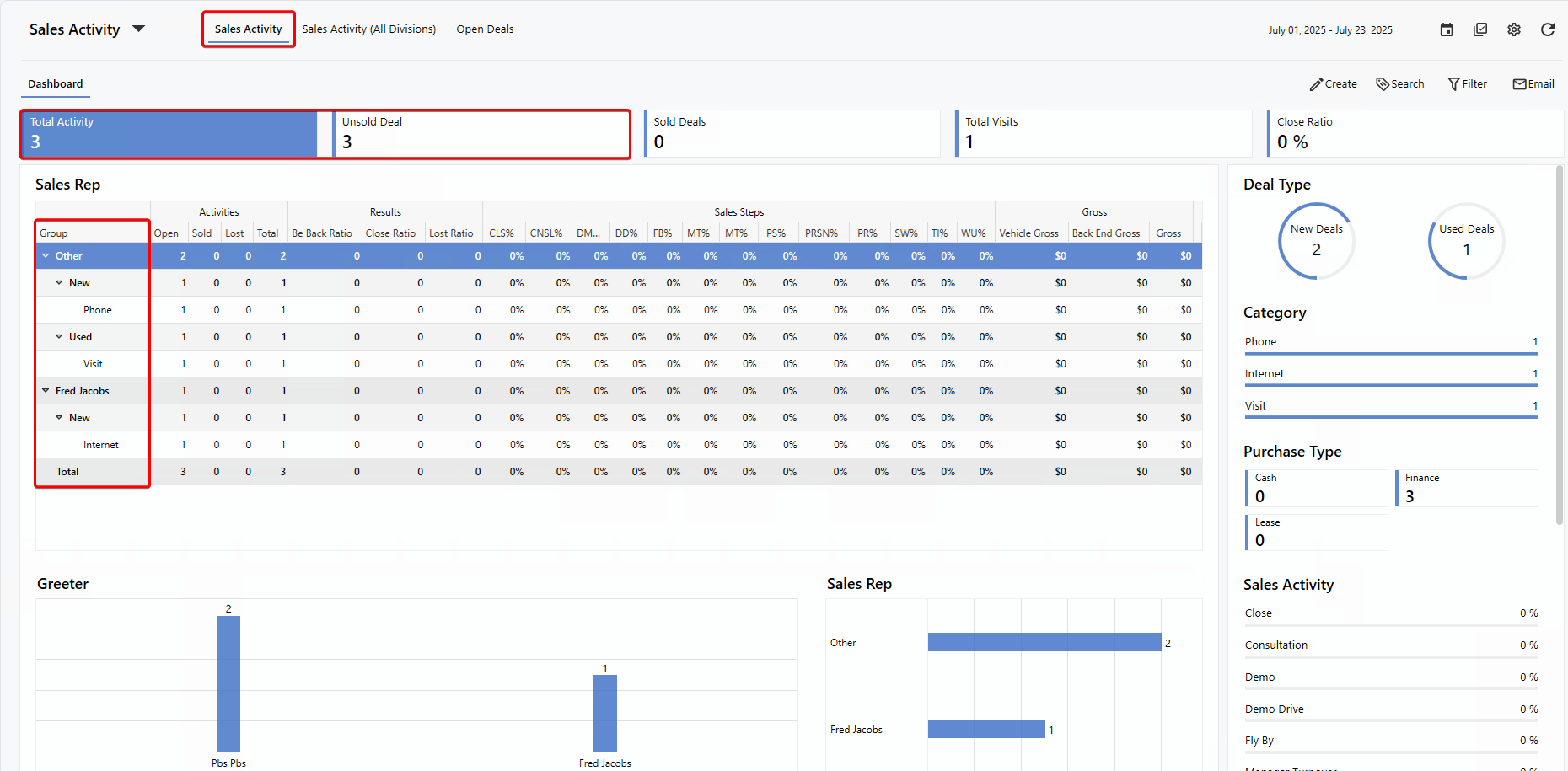
A new layer for
New
and
Used
deals has been added to each group in the Dashboard Summary, organizing activity data by deal type. This makes it easier to identify whether a Sales Activity relates to a new or used vehicle.
The drop down arrow in the
Group
column provides an additional breakdown by
Category:
Metrics
Two new Metrics are now displayed at the top of the Sales Activity Dashboard.
-
Total Activity
- Shows the combined total of all Sales Activity types (Phone, Internet, Visit).
-
Unsold Deals
- Includes all deal statuses except Sold, Delivered, or Posted.
From the detailed view of the dashboard, Sales Activities can be opened directly by clicking on them. You can also right-click to select
View Deal
or
View Activity
to see the Deal and its associated activities.
Hover tips have been added to column headers - including custom Sales Steps - providing the full column name.
Note:
Only Users with
Gross Access
permission can view the Gross grouping and columns across all views.
Groupings
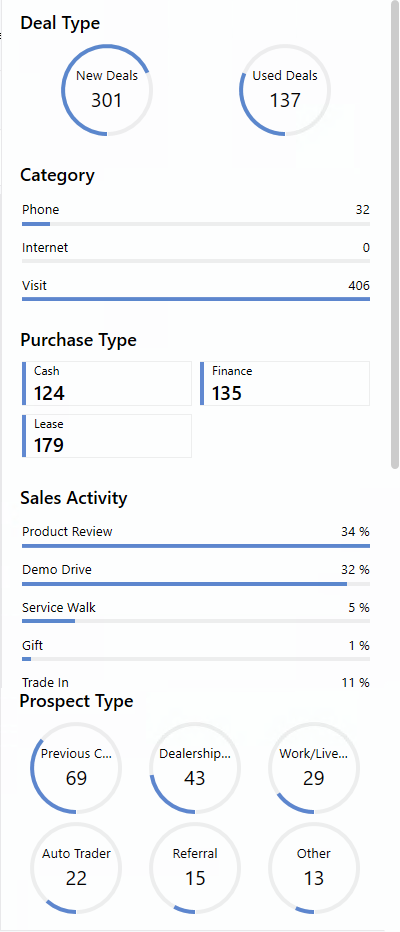
The Groupings on the right provide a clear summary of Sales Activity counts, by:
-
Deal Type (New, Used)
-
Category (Phone, Internet Visit)
-
Purchase Type (Cash, Finance, Lease)
-
Sales Activity (Demo Drive, Service Walk, ...)
-
Prospect Type (Previous Customer, Dealership Web site, Referral, ...)
deal statuses and new/used vehicle types - giving Users an at-a-glance view of key details.
Insights
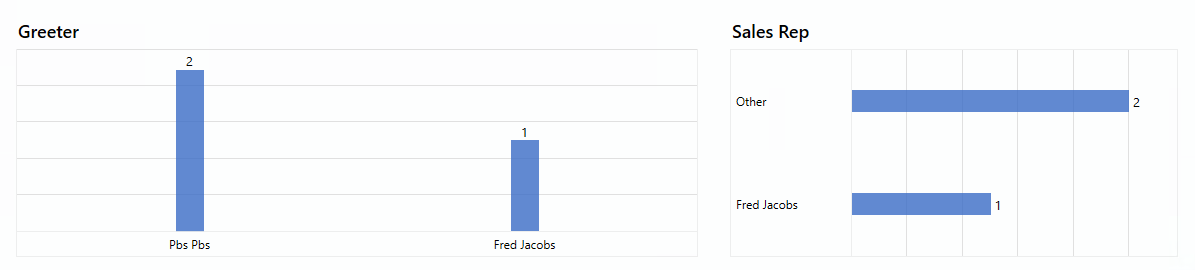
The Insights section at the bottom display Sales Activity data for both the
Greeter
and
Sales Rep
roles.
Right Click Views
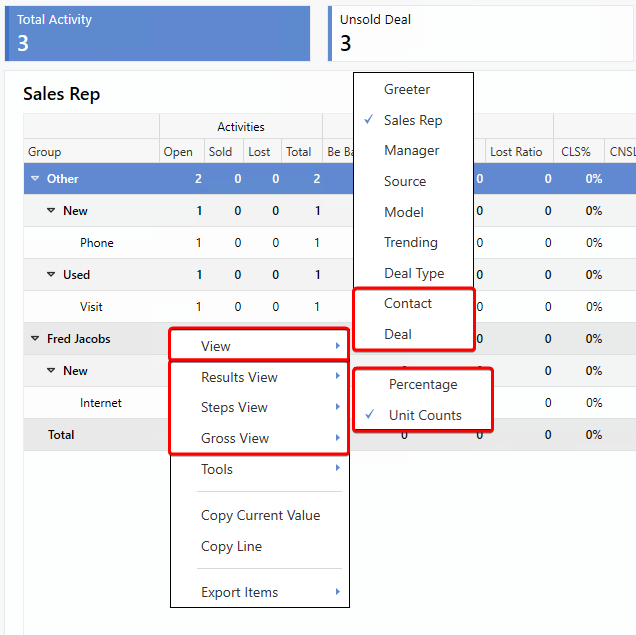
Two new Views have been added to the right-click View menu:
Additionally, three new view options for Sales Activity have been introduced:
-
Results View - Toggle between
Percentage
and
Unit Count.
-
Steps View - Toggle between
Percentage
and
Unit Count.
-
Gross View - Toggle between
Average Gross Per Unit
and
Total Gross.
Advanced Filter
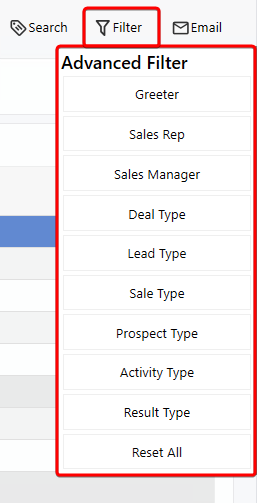
The
Advanced Filter,
available in both the summary and detailed views of the Dashboard, enables Users to quickly refine data with flexible filtering options for greater precision and control.
Source Required Field
When creating a Sales Activity from the dashboard, a new
Source
dropdown is now available. This field is populated with values configured in
Source Maintenance.
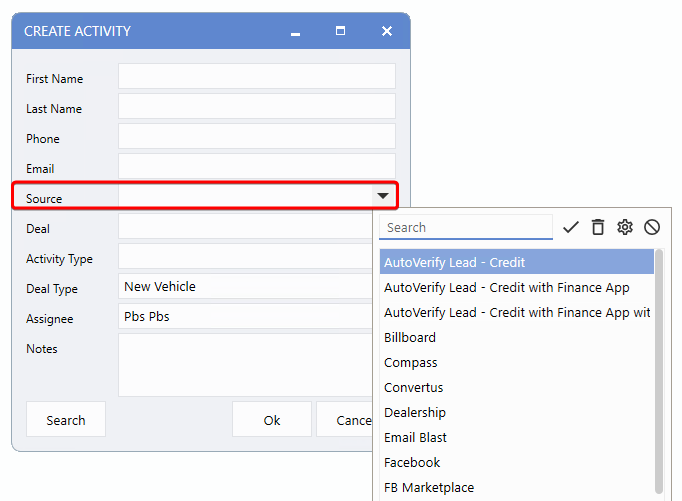
This field follows the existing
Control Flag
settings, which define whether a deal can be saved without a source selected.
To enable these flags, please contact PBS Support.
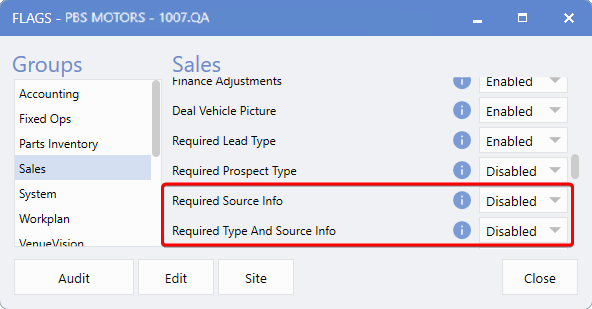
For PBS Support only.
To access this feature, follow the path:
System > Tools > Control Flags > Sales
Sales Mobile App
The Sales Activity enhancements have also been extended to the Sales App, providing seamless mobile access on the go.
-
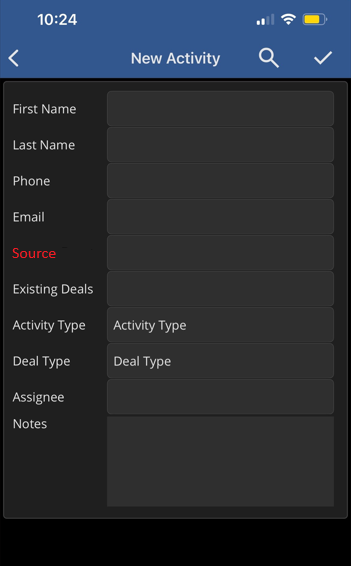
Activity Type is now a required field when saving an Activity in the mobile app.
-
The
Source
field has been added and follows the existing
Control Flag
settings, which determine whether a deal can be without a source:
|